ashhawk: A happy CGI seal wearing a flower crown (Default)

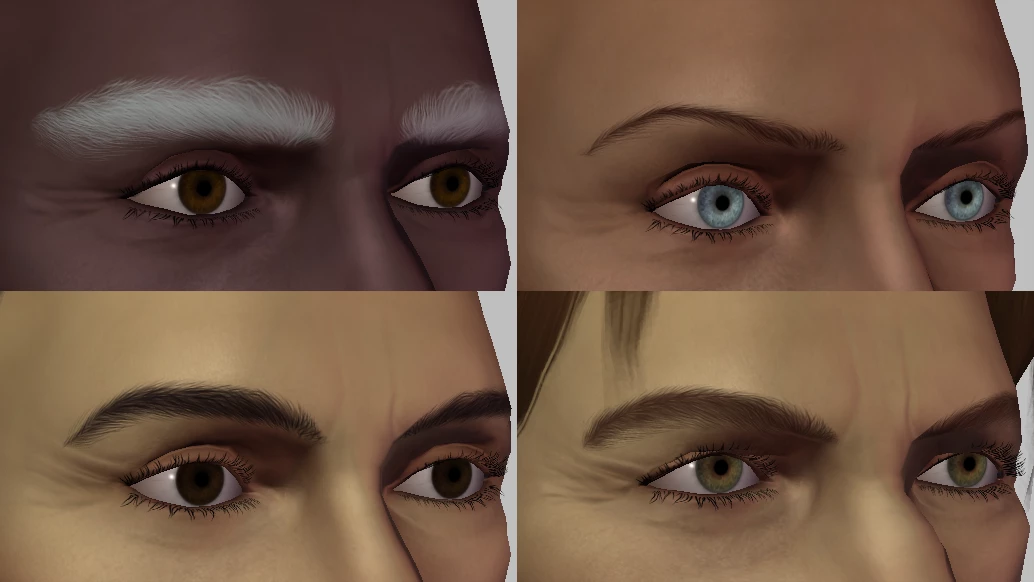
High quality replacer for eyebrows, beard stubble and scalp stubble/crew cuts/buzz cuts.

Comparison of the different eyebrow thicknesses on some preset heads

This mod replaces the default eyebrows, beard stubble and scalp stubble options with smooth, detailed versions that stay largely true to the vanilla shapes while fixing various issues that they had. (No looking sad when you lower your warden’s brows!)

Lots and lots and lots more images on Nexus.

But here's a gigantic one )
ashhawk: A happy CGI seal wearing a flower crown (Default)

Removes one or both of the uncomfortable postprocessing effects in all Fade scenes: the radial blur over the whole screen, and (optionally) the wavy distortion at the edges.

Comparison image of Mouse in the Fade; the left side is blurred and the right side is clear

This mod applies to all scenes in the Fade, removing the radial blur that gives some people motion sickness (or just unhappy eyeballs) and, depending on which file you choose, can remove the wavy distortion around the edges too.

Turning off "Frame Buffer Effects" in the Options menu has been my go-to technique to remove these effects in the past, but that way you also lose other atmospheric effects, such as depth of field and bloom, and in the Fade it changes the lighting dramatically. This mod keeps all of that intact and only removes the blur and (optionally) the distortion. There is also the option to restrict the distortion closer to the edges of the screen if you don't remove it.

ashhawk: A happy CGI seal wearing a flower crown (Default)

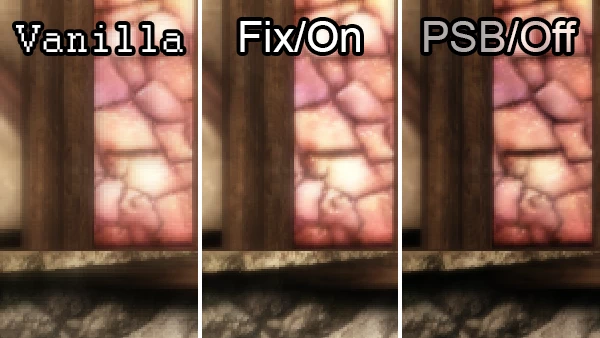
Fixes a bug in the mod Pixelated Shaders Begone that stops the bloom shader working. (Alternatively, turns the bloom off more efficiently.)

A comparison of vanilla versus on versus off: the left is very pixelated; the centre is unpixelated; the right is unpixelated but dark

Pixelated Shaders Begone is a wonderful little mod that everyone should have, but if you’ve ever wondered why it made the bloom look a lot more...subtle, it’s because there’s a tiny bug (a missing tag closer on line 26) that actually results in the bloom being completely turned off. I’ve provided two options:

  • Bloom On: This file will turn the bloom back on, with the de-pixelating fix as the original modder intended. It will look a lot like vanilla bloom (just, you know, not pixelated).
  • Bloom Off: If you’re like me, you sort of got used to no bloom. Or maybe also like me, you’re still a little bloomed-out from the late 2000s. Or you have a third party postprocessor that does it better. Either way, maybe you didn’t really miss the bloom. This file turns the bloom off more efficiently – rather than broken code failing, the code that invokes the different parts of the effect (and everything they need) is removed. I don’t know if it will improve performance since I don’t know how the shaders handle errors, but it certainly won’t hurt it. There will be no visual change if you were already using Pixelated Shaders Begone.

More images on Nexus!

Profile

ashhawk: A happy CGI seal wearing a flower crown (Default)
Ashhawk

Expand Cuts?

No cut tags

Tags

Feeds

RSS Atom

Theme Credit

Page generated 15 Dec 2025 06:08
Powered by Dreamwidth Studios